


WhatsApp Messenger
4.61.95M Reviews
App Specs
- Version
- 2.26.41.77
- Updated On
- License
- Free
- Downloads
- 10,000,000,000+
- Developer
- WhatsApp LLC
- Categories
- Communication
- Platform
- Android, iOS
Screenshots
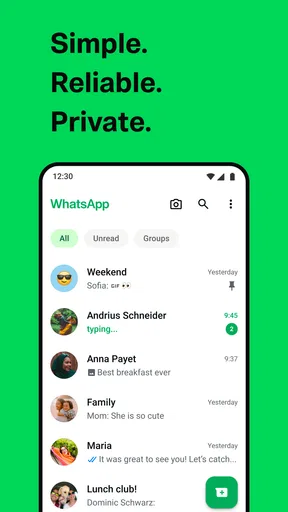


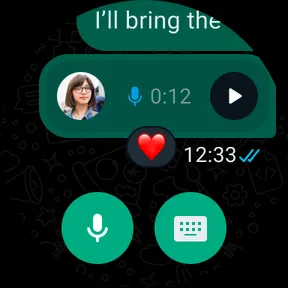

 Analysis by AppCompare
I find WhatsApp Messenger most useful when a household needs one familiar place to sort out ordinary plans: who is picking someone up, whether groceries are needed, or which photo shows the right appointment card. It is a communication app from WhatsApp LLC, and its appeal is less about novelty than about being a common meeting point. When relatives, friends, and local groups already use it, a short message can reach people without asking everyone to learn a new tool.
One household, several conversations
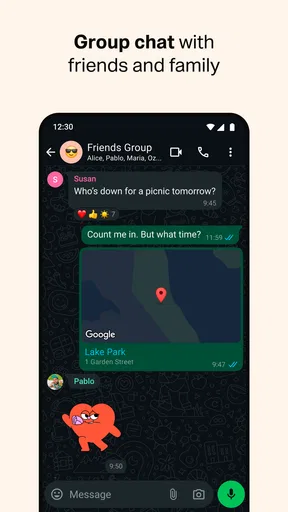
A realistic day might start with a family group chat confirming a change of plans, continue with a direct message to one person about a private detail, and end with a call when typing is inconvenient. Keeping these exchanges in one app can reduce the scatter of texts, calls, and separate social platforms. I like that a group can handle broad coordination while one-to-one chats remain available for details that do not belong in front of everyone.
That convenience works best when the group has a clear purpose. A household chat can become noisy if it is used for every joke, forwarded item, and minor update. I would agree on simple habits: use direct messages for personal matters, put time-sensitive plans in the group, and avoid treating silence as confirmation. The app helps deliver messages; it cannot make everyone read or act on them.
Guides and Analysis on WhatsApp Messenger
For shared-device situations, I would be especially careful about account boundaries. A phone number is central to getting started, so the account should belong to the person who will actually use it, not to whoever happens to own the device. If several people share one handset, conversations and notifications can easily be seen by the wrong person. I would not treat a shared phone as a private messaging space unless everyone understands who can access it and agrees on the arrangement.
Set expectations before adding people
Setup is straightforward, but the small decision that matters most comes before the first group invitation: who should be included, and what is the chat for? A group with relatives across different households may be useful for event planning, while a smaller group is better for daily logistics. Keeping the audience appropriate is a practical privacy step, not just a matter of tidiness.
I also recommend checking the recipient before sending anything personal, especially when a contact has a familiar name or a message is being forwarded quickly. A photo, document, or live detail can be more revealing than a line of text. The ability to share media and location is convenient, but I use those tools deliberately: share only what the other person needs, and choose a private conversation when the whole group does not need to know.
The app is free to download and use, though in-app purchases are listed from around forty cents to nearly two hundred dollars per item. That is worth knowing if a younger person uses the device or if the household keeps a tight handle on spending. I would check purchase settings on the device rather than assume that “free” means every possible transaction is unavailable.
Worth Reading Before You Choose

Baby Panda World Brings Quick Play to Modern Phones, but Its Game Library Feels Busy

ESPN’s Live Game View Makes Following Close Games Easier

QuizzLand Review: A Good Fit for Short Trivia Breaks, Not Every Player

Basketball Stars: Multiplayer Is Fast, but Can It Recover When Matches Go Wrong?

WEBTOON Turns Phone Updates Into a Better Reading Routine

Link to Windows Runs on Shared Habits, Not Social Feeds
Age, trust, and the limits of a chat app
WhatsApp carries an Everyone content rating, but that label is not a substitute for an age-appropriate conversation. Messaging can bring a young user into contact with people, groups, links, images, and requests that need judgement. I would explain how to pause before responding, how to tell a trusted adult about uncomfortable contact, and why private information should not be shared just because someone in a chat asks for it.
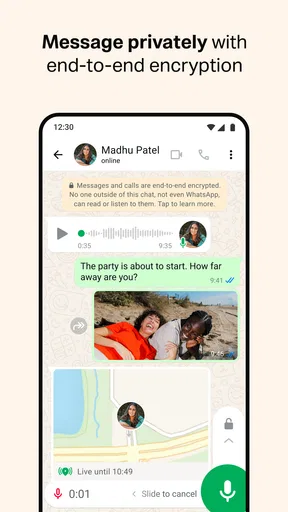
End-to-end encryption is a meaningful privacy feature for conversations, but it does not prevent someone from taking a screenshot, showing a message to another person, or forwarding material. Nor does it make every group trustworthy. My practical rule is simple: send only what I would be comfortable with the recipient seeing, and be cautious with sensitive information even when a chat feels familiar.
Where it fits among messaging options
Compared with ordinary SMS, WhatsApp is more flexible for internet-based messaging, group coordination, media sharing, and voice or video calls. SMS can be the more straightforward fallback when a contact does not use the app or internet messaging is not practical. Compared with social networks, WhatsApp feels more focused on direct conversations and known contacts, rather than public posting and browsing. That focus is a strength, although it does not make the app a replacement for every kind of communication.
If your household already relies on another service that everyone checks, switching may create more confusion than it solves. The best group chat is usually the one participants actually open. I would choose WhatsApp when the people who matter are already there and when a straightforward mix of messages, calls, and shared media covers the need. I would look elsewhere for public community discussions, formal records that need careful filing, or a system designed around household task management.
WhatsApp is a particularly good fit for relatives spread across locations, friends arranging an outing, and small groups that need to exchange quick updates without coordinating through several channels. It is less suitable as the sole place for urgent safety plans: a message might be missed, a phone may be unavailable, and group membership can change. For something urgent, I would call directly or use another agreed method instead of relying on a chat notification.
The app has a 4.7 average from around 236 million ratings, and it has been installed over 10 billion times. Those figures help explain why it is so often a practical choice: many people may already know how to use it. They do not guarantee that it will suit every household, though. A popular service can still feel distracting, and the steady stream of group messages may be a reason to mute a chat or leave one that no longer serves a purpose.
Connecting the World, One Message at a Time
At its core, WhatsApp is all about communication. It's designed to make messaging as easy and intuitive as possible. Whether you're texting your best friend or sending a voice note to a family member halfway across the world, WhatsApp has got you covered. The app uses your phone's internet connection, so you can send messages without worrying about traditional SMS charges. Pretty neat, right?
Features Galore
What truly sets WhatsApp apart is its feature-rich platform. Not only can you send text messages, but you can also share images, videos, documents, and even your location. And let's not forget about the group chats! You can create groups with up to 256 people. Perfect for planning that surprise birthday party or just sharing memes with your entire family.
One of my favorite features has to be the voice and video calls. They're crystal clear and, since they use the internet, they don't eat into your phone plan minutes. Plus, with the addition of end-to-end encryption, you know your conversations are private and secure. That's some James Bond-level security right there!
For a busy group, I find it useful to treat different message types as tools for different jobs. A short text is usually easiest to scan later; a voice note can be quicker when someone is walking or has their hands full, but it is harder to search by meaning than a written detail. If a time, address, or item matters, I prefer to include it plainly in text even when the rest of the conversation is a voice note. That small habit makes plans easier to check without replaying audio.
Location sharing can also help with a one-off meeting, such as finding each other near a crowded venue, but I would not share it automatically just because the option is there. Think about who needs it and for how long, then stop sharing when the purpose has passed. The same judgement applies to documents: the ability to send a file is handy for a school notice or itinerary, but a chat is not necessarily the best long-term filing cabinet. I save important documents somewhere intended for keeping them.
Easy Peasy Setup
Getting started with WhatsApp is a breeze. Just download the app, verify your phone number, and you're good to go. The interface is user-friendly, with a clean design that makes navigation a piece of cake. Even if you’re not the most tech-savvy person, you’ll find it pretty straightforward.
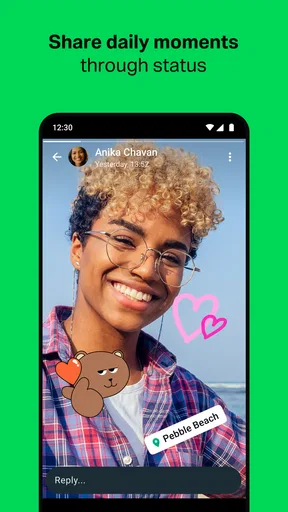
And did I mention the status feature? Think of it as a mini social media feed where you can share photos, videos, and text updates with your contacts. It's a fun way to keep everyone in the loop about what you're up to.
For someone moving from SMS, the key adjustment is that WhatsApp conversations depend on the other person using the service and on an internet connection. I would keep that in mind before assuming a message will reach every contact the same way a traditional text might. If a relative is not on WhatsApp, the simplest answer may be to contact them through the method they already use, rather than persuade the whole family to move.
New users may also appreciate a little housekeeping early on. I would make sure contacts are recognizable, decide which groups deserve notifications, and take a moment to understand how the app presents incoming media before joining several active chats. These choices matter more than customizing everything: they help the app stay useful instead of turning into another stream of interruptions.
Keeping Up with the Times
WhatsApp is constantly updating to meet the needs of its users. From introducing dark mode to rolling out WhatsApp Web for desktop use, the developers are always working to enhance the user experience. They even added a disappearing messages feature, which is perfect if you're a fan of temporary conversations.
Disappearing messages are useful when a conversation is meant to be temporary, but I would not mistake them for a guarantee that information has vanished from every place it could have been seen or saved. The same common-sense rule applies to any messaging service: temporary settings can reduce clutter, not replace trust. If a detail needs to remain available, I would keep a proper copy rather than rely on an old chat as its only record.
Desktop access is convenient when I am already working at a computer and need to answer a quick message without switching devices. I see it as an extension of the conversation, not a reason to leave a session unattended on a shared computer. In a household or workplace with shared screens, signing out and being mindful of who can see the display are simple habits that protect account boundaries.
And let's not overlook the business side of things. With WhatsApp Business, small businesses can connect with customers, showcase products, and offer customer support directly through the app. It's a game-changer for entrepreneurs everywhere.
For a small business, that direct line can make routine questions easier to handle, especially when customers already recognize the service. Still, I would keep customer conversations organized and avoid promising instant replies if nobody is monitoring the account all the time. A personal household chat and a customer-facing channel have different expectations; keeping those roles separate helps prevent private messages and work requests from becoming one confusing stream.
WhatsApp is free and has an Everyone age rating, which makes it accessible to a broad audience, while its developer is WhatsApp LLC. It first appeared on October 18, 2010, and its enormous reach—more than 10 billion installs—means that many people will encounter it through friends or family. Its high average rating of 4.7, drawn from around 236 million ratings and 2 million reviews, is a sign of widespread use, not a promise that every feature or social situation will feel right for you.
My household verdict is that WhatsApp is worth using when it reduces friction between people who already want to stay in touch. I would use it for everyday coordination, calls, and sharing the occasional useful file, while setting sensible limits around group noise, private details, and shared devices. If your family needs a formal schedule, guaranteed urgent alerts, or a durable archive, pair messaging with tools made for those jobs. Used with those boundaries, WhatsApp Messenger is a practical way to keep ordinary conversations close without pretending that one app can solve every communication problem.
In conclusion, WhatsApp Messenger is more than just a messaging app; it’s a way to connect with the world. Whether you're chatting with friends, catching up with family, or running a business, WhatsApp offers a seamless and secure platform to do it all. So, if you haven't jumped on the WhatsApp bandwagon yet, what's stopping you?
Pros
- User-friendly interface
- intuitive to navigate.
- End-to-end encryption ensures privacy.
- Wide compatibility across devices.
- Voice and video call features work smoothly.
- Supports a variety of media file types.
Cons
- Requires constant internet connection.
- Limited customization options.
- No built-in GIF creation tool.
- Group chats can be overwhelming.
- Backup and restore can be glitchy.
FAQs for WhatsApp Messenger
What are the primary features of WhatsApp Messenger?
WhatsApp Messenger offers instant messaging, voice and video calls, and multimedia sharing such as photos, videos, and documents. You can also create group chats, use end-to-end encryption for security, and enjoy a user-friendly interface. It's available on both Android and iOS platforms, making it widely accessible.
Is WhatsApp Messenger free to use?
Yes, WhatsApp Messenger is free to download and use. It requires an internet connection through Wi-Fi or mobile data. While there are no subscription fees, using mobile data might incur charges from your carrier, so it's advisable to check your data plan if you're not using Wi-Fi.
How secure is WhatsApp Messenger?
WhatsApp uses end-to-end encryption to ensure that only you and the person you're communicating with can read or listen to what's sent. This means that even WhatsApp cannot access these messages. It's a strong feature for those concerned about privacy and security in their communications.
Can I use WhatsApp on multiple devices simultaneously?
WhatsApp primarily works on a single smartphone, linked to your phone number. However, you can use WhatsApp Web or Desktop to access your account from a computer. These require your phone to be connected to the internet, as they mirror the app from your phone.
Does WhatsApp Messenger support multimedia sharing?
Yes, WhatsApp Messenger supports sharing various types of media, including images, videos, documents, and voice messages. You can also share your location and contacts. The app allows easy and quick sharing, making it convenient for both personal and professional communication.


